

Description
Focus-Driven Task Manager for Asana Users
Overview
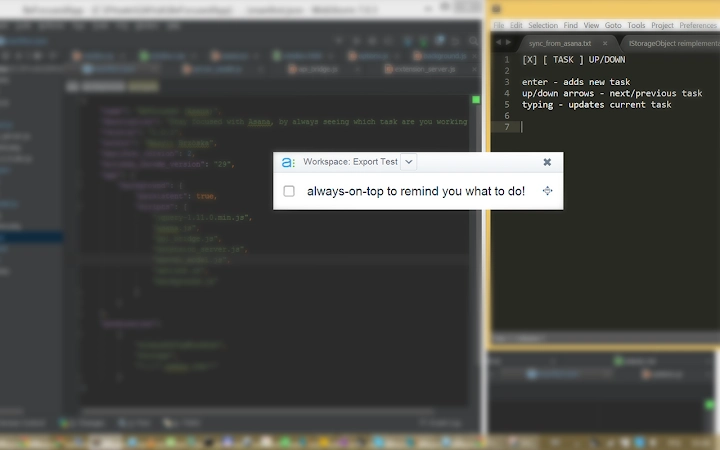
BeFocusedApp is a desktop utility designed to help users maintain concentration by displaying their current task directly in the active workspace, regardless of the application they are using. Built as a lightweight overlay tool, it integrates with Asana to show tasks assigned to the user and marked for today, enabling seamless task tracking without context switching. The software is ideal for professionals who rely on Asana for project management and seek a distraction-free way to stay aligned with their priorities. It supports real-time task updates, quick completion, and on-the-fly additions, making it suitable for dynamic work environments.
Users can complete tasks with a simple Ctrl + Enter shortcut, navigate between tasks using arrow keys, and edit or create new tasks by typing. The app’s minimal interface ensures it doesn’t interfere with workflow, while its background integration keeps focus on the primary task. It is particularly useful for individuals who manage multiple small tasks throughout the day, such as developers, writers, and project coordinators. The app is open-source, with its code hosted on GitHub, encouraging community contributions and transparency. While the developer did not provide additional system requirements, the software is available for both Windows and Mac, indicating broad platform compatibility.
Key Features & Capabilities
- Asana Integration – Syncs with Asana to display tasks assigned to the user and marked for today, ensuring real-time alignment with project plans.
- Overlay Display – Shows the current task on top of all other applications, allowing users to maintain focus without switching windows.
- Quick Task Completion – Complete tasks instantly using the Ctrl + Enter keyboard shortcut, streamlining workflow efficiency.
- Task Navigation – Use up/down arrow keys to move between tasks, enabling smooth transitions during task execution.
- On-the-Fly Task Creation – Type to create new tasks directly in the app, ideal for capturing spontaneous work items.
- Minimal UI with Header Toggle – Users can hide the header to reduce visual clutter, though this affects window movement until toggled back.
These features support a frictionless workflow for users who need to stay agile with task management. For example, a content writer can quickly add a new subtask while drafting, complete it with a keyboard shortcut, and immediately shift focus to the next item—all without leaving their word processor. Similarly, a project manager can review daily priorities at a glance while monitoring multiple tools. The app’s reliance on Asana as a backend ensures data consistency and eliminates the need for duplicate entries. The developer has expressed interest in future enhancements, including OAuth support and potential time tracking integration, which may expand functionality over time.
User Interface, Workflow & Performance
The user interface of BeFocusedApp is intentionally minimal, focusing on readability and non-intrusiveness. The main display shows the current task in a clean, centered format, with options to toggle the header for a more compact view. Navigation is handled entirely via keyboard shortcuts, aligning with productivity-focused workflows. This design reduces mouse dependency and supports rapid task switching, which is beneficial for users who prefer keyboard-centric operation.
Workflow efficiency is enhanced by the app’s ability to function as a persistent overlay, ensuring the user always sees their current task regardless of the active application. The simplicity of the interface reduces cognitive load, helping users stay in a state of flow. While exact performance details were not specified, the software is designed to run in the background with minimal system impact. The developer did not provide information on CPU or RAM usage, nor on stability under prolonged use. However, its lightweight nature and reliance on a stable backend (Asana) suggest it operates efficiently in typical desktop environments. The app’s open-source nature allows for community scrutiny and potential performance improvements over time.
Compatibility & System Requirements
BeFocusedApp is available for both Windows and Mac operating systems, supporting desktop environments on these platforms. The software has a file size of 200 MB, which is moderate for a desktop application with integration capabilities. The version number is 1.0, indicating an initial stable release. The developer did not specify exact system requirements, such as minimum RAM, processor speed, or disk space beyond the installed size. Compatibility information is limited to the operating systems listed.
Users are required to provide an API key from their Asana account to activate the app. This key must be obtained from the Asana account settings page. The app does not currently support OAuth, meaning users must manually manage their API credentials. The lack of detailed system requirements means that users should ensure their system can run standard desktop applications and support web-based API integrations. The software is designed to run in the background and interact with the Chrome environment, suggesting compatibility with modern browsers.
Pros and Cons
Pros
- Seamless integration with Asana for real-time task visibility
- Minimal, distraction-free interface that stays on top of other apps
- Keyboard-driven navigation and task completion for high efficiency
- Open-source with public GitHub repository for transparency and contributions
- Free to use with no licensing barriers
Cons
- No official system requirements provided
- Requires manual API key input; no OAuth support currently
- Header toggle disables window movement until re-enabled
- Performance and resource usage details not disclosed
- Future features like time tracking are not yet implemented
FAQ Section
Is BeFocusedApp compatible with both Windows and Mac?
Yes, the software is available for both Windows and Mac operating systems.
Do I need to provide an API key to use the app?
Yes, an API key from your Asana account is required to authenticate and sync tasks.
Is the app secure to use?
BeFocusedApp uses your Asana API key for authentication. The app does not store your credentials. For security, ensure you keep your API key private and revoke it if compromised.
Can I use the app offline?
While the app can run locally, it requires an active connection to Asana to fetch and update tasks. Offline usage is not supported.
Is there a license type for the software?
BeFocusedApp is open-source and free to use. The source code is available on GitHub under a permissive license, allowing modification and redistribution.
Final Thoughts
BeFocusedApp delivers a focused, efficient solution for Asana users who want to minimize distractions and maintain workflow continuity. Its clean interface, keyboard-centric design, and seamless backend integration make it a valuable tool for professionals managing dynamic workloads. While it lacks detailed system specifications and advanced features like OAuth or time tracking, its core functionality is well-executed and purpose-built. The open-source model adds trust and transparency, encouraging community involvement. For individuals who rely on Asana and value uninterrupted focus, this tool offers a practical, lightweight enhancement to their daily routine.
Download BeFocusedApp now
Guides & Tutorials for BeFocused (Asana) App for Chrome
How to install BeFocused (Asana) App for Chrome
- Click the Preview / Download button above.
- Once redirected, accept the terms and click Install.
- Wait for the BeFocused (Asana) App for Chrome download to finish on your device.
How to use BeFocused (Asana) App for Chrome
This software is primarily used for its core features described above. Open the app after installation to explore its capabilities.
User Reviews for BeFocused (Asana) App for Chrome 0
No reviews found





